Immich unter Podman installieren

Zitat von HKaufmann am 17. März 2026, 12:49 UhrHallo zusammen,
möchte gerne Immich lokal unter Podman installieren. Weiss nicht wie ich die .yml Datei anpassen soll, da diese für Docker ist.
Habe schon eine Verzeichnis unter ~/Daten/DBank/immich-app erstellt und dort eine yml Datei von https://docs.immich.app/install/docker-compose/ geholt:
# WARNING: To install Immich, follow our guide: https://docs.immich.app/install/docker-compose
#
# Make sure to use the docker-compose.yml of the current release:
#
# https://github.com/immich-app/immich/releases/latest/download/docker-compose.yml
#
# The compose file on main may not be compatible with the latest release.
name: immich
services:
immich-server:
container_name: immich_server
image: ghcr.io/immich-app/immich-server:${IMMICH_VERSION:-release}
# extends:
# file: hwaccel.transcoding.yml
# service: cpu # set to one of [nvenc, quicksync, rkmpp, vaapi, vaapi-wsl] for accelerated transcoding
volumes:
# Do not edit the next line. If you want to change the media storage location on your system, edit the value of UPLOAD_LOCATION in the .env file
- ${UPLOAD_LOCATION}:/data
- /etc/localtime:/etc/localtime:ro
env_file:
- .env
ports:
- '2283:2283'
depends_on:
- redis
- database
restart: always
healthcheck:
disable: false
immich-machine-learning:
container_name: immich_machine_learning
# For hardware acceleration, add one of -[armnn, cuda, rocm, openvino, rknn] to the image tag.
# Example tag: ${IMMICH_VERSION:-release}-cuda
image: ghcr.io/immich-app/immich-machine-learning:${IMMICH_VERSION:-release}
# extends: # uncomment this section for hardware acceleration - see https://docs.immich.app/features/ml-hardware-acceleration
# file: hwaccel.ml.yml
# service: cpu # set to one of [armnn, cuda, rocm, openvino, openvino-wsl, rknn] for accelerated inference - use the `-wsl` version for WSL2 where applicable
volumes:
- model-cache:/cache
env_file:
- .env
restart: always
healthcheck:
disable: false
redis:
container_name: immich_redis
image: docker.io/valkey/valkey:9@sha256:546304417feac0874c3dd576e0952c6bb8f06bb4093ea0c9ca303c73cf458f63
healthcheck:
test: redis-cli ping || exit 1
restart: always
database:
container_name: immich_postgres
image: ghcr.io/immich-app/postgres:14-vectorchord0.4.3-pgvectors0.2.0@sha256:bcf63357191b76a916ae5eb93464d65c07511da41e3bf7a8416db519b40b1c23
environment:
POSTGRES_PASSWORD: ${DB_PASSWORD}
POSTGRES_USER: ${DB_USERNAME}
POSTGRES_DB: ${DB_DATABASE_NAME}
POSTGRES_INITDB_ARGS: '--data-checksums'
# Uncomment the DB_STORAGE_TYPE: 'HDD' var if your database isn't stored on SSDs
# DB_STORAGE_TYPE: 'HDD'
volumes:
# Do not edit the next line. If you want to change the database storage location on your system, edit the value of DB_DATA_LOCATION in the .env file
- ${DB_DATA_LOCATION}:/var/lib/postgresql/data
shm_size: 128mb
restart: always
healthcheck:
disable: false
volumes:
model-cache:
Da mein Englisch nicht gut ist, brauchte ich ein bißchen Hilfe.
Podman Version 4.9.3 ist installiert. Arbeite mit Linux-Mint 22.3
Ansicht wollte ich die SQLite verwenden, nur wird diese leider nicht unterstützt.
Habe eine zweite -yml Datei die nur für rooless entdeckt:
# WARNING: To install Immich, follow our guide: https://docs.immich.app/install/docker-compose
#
# Make sure to use the docker-compose.yml of the current release:
#
# https://github.com/immich-app/immich/releases/latest/download/docker-compose.yml
#
# The compose file on main may not be compatible with the latest release.
name: immich
services:
immich-server:
container_name: immich_server
image: ghcr.io/immich-app/immich-server:${IMMICH_VERSION:-release}
# extends:
# file: hwaccel.transcoding.yml
# service: cpu # set to one of [nvenc, quicksync, rkmpp, vaapi, vaapi-wsl] for accelerated transcoding
user: '1000:1000'
security_opt:
- no-new-privileges:true
cap_drop:
- NET_RAW
volumes:
# Do not edit the next line. If you want to change the media storage location on your system, edit the value of UPLOAD_LOCATION in the .env file
- ${UPLOAD_LOCATION}:/data
- /etc/localtime:/etc/localtime:ro
env_file:
- .env
ports:
- '2283:2283'
depends_on:
- redis
- database
restart: always
healthcheck:
disable: false
immich-machine-learning:
container_name: immich_machine_learning
# For hardware acceleration, add one of -[armnn, cuda, rocm, openvino, rknn] to the image tag.
# Example tag: ${IMMICH_VERSION:-release}-cuda
image: ghcr.io/immich-app/immich-machine-learning:${IMMICH_VERSION:-release}
# extends: # uncomment this section for hardware acceleration - see https://docs.immich.app/features/ml-hardware-acceleration
# file: hwaccel.ml.yml
# service: cpu # set to one of [armnn, cuda, rocm, openvino, openvino-wsl, rknn] for accelerated inference - use the `-wsl` version for WSL2 where applicable
user: '1000:1000'
security_opt:
- no-new-privileges:true
cap_drop:
- NET_RAW
volumes:
- ./ml-model-cache:/cache
- ./ml-dotcache:/.cache
- ./ml-config:/.config
env_file:
- .env
restart: always
healthcheck:
disable: false
redis:
container_name: immich_redis
image: docker.io/valkey/valkey:9@sha256:3eeb09785cd61ec8e3be35f8804c8892080f3ca21934d628abc24ee4ed1698f6
user: '1000:1000'
security_opt:
- no-new-privileges:true
cap_drop:
- NET_RAW
volumes:
- ./redis:/data
healthcheck:
test: redis-cli ping || exit 1
restart: always
database:
container_name: immich_postgres
image: ghcr.io/immich-app/postgres:14-vectorchord0.4.3-pgvectors0.2.0@sha256:bcf63357191b76a916ae5eb93464d65c07511da41e3bf7a8416db519b40b1c23
user: '1000:1000'
security_opt:
- no-new-privileges:true
cap_drop:
- NET_RAW
environment:
POSTGRES_PASSWORD: ${DB_PASSWORD}
POSTGRES_USER: ${DB_USERNAME}
POSTGRES_DB: ${DB_DATABASE_NAME}
POSTGRES_INITDB_ARGS: '--data-checksums'
# Uncomment the DB_STORAGE_TYPE: 'HDD' var if your database isn't stored on SSDs
# DB_STORAGE_TYPE: 'HDD'
volumes:
# Do not edit the next line. If you want to change the database storage location on your system, edit the value of DB_DATA_LOCATION in the .env file
- ${DB_DATA_LOCATION}:/var/lib/postgresql/data
shm_size: 128mb
restart: always
healthcheck:
disable: false
volumes:
model-cache:Gruß Holger
Hallo zusammen,
möchte gerne Immich lokal unter Podman installieren. Weiss nicht wie ich die .yml Datei anpassen soll, da diese für Docker ist.
Habe schon eine Verzeichnis unter ~/Daten/DBank/immich-app erstellt und dort eine yml Datei von https://docs.immich.app/install/docker-compose/ geholt:
# WARNING: To install Immich, follow our guide: https://docs.immich.app/install/docker-compose
#
# Make sure to use the docker-compose.yml of the current release:
#
# https://github.com/immich-app/immich/releases/latest/download/docker-compose.yml
#
# The compose file on main may not be compatible with the latest release.
name: immich
services:
immich-server:
container_name: immich_server
image: ghcr.io/immich-app/immich-server:${IMMICH_VERSION:-release}
# extends:
# file: hwaccel.transcoding.yml
# service: cpu # set to one of [nvenc, quicksync, rkmpp, vaapi, vaapi-wsl] for accelerated transcoding
volumes:
# Do not edit the next line. If you want to change the media storage location on your system, edit the value of UPLOAD_LOCATION in the .env file
- ${UPLOAD_LOCATION}:/data
- /etc/localtime:/etc/localtime:ro
env_file:
- .env
ports:
- '2283:2283'
depends_on:
- redis
- database
restart: always
healthcheck:
disable: false
immich-machine-learning:
container_name: immich_machine_learning
# For hardware acceleration, add one of -[armnn, cuda, rocm, openvino, rknn] to the image tag.
# Example tag: ${IMMICH_VERSION:-release}-cuda
image: ghcr.io/immich-app/immich-machine-learning:${IMMICH_VERSION:-release}
# extends: # uncomment this section for hardware acceleration - see https://docs.immich.app/features/ml-hardware-acceleration
# file: hwaccel.ml.yml
# service: cpu # set to one of [armnn, cuda, rocm, openvino, openvino-wsl, rknn] for accelerated inference - use the `-wsl` version for WSL2 where applicable
volumes:
- model-cache:/cache
env_file:
- .env
restart: always
healthcheck:
disable: false
redis:
container_name: immich_redis
image: docker.io/valkey/valkey:9@sha256:546304417feac0874c3dd576e0952c6bb8f06bb4093ea0c9ca303c73cf458f63
healthcheck:
test: redis-cli ping || exit 1
restart: always
database:
container_name: immich_postgres
image: ghcr.io/immich-app/postgres:14-vectorchord0.4.3-pgvectors0.2.0@sha256:bcf63357191b76a916ae5eb93464d65c07511da41e3bf7a8416db519b40b1c23
environment:
POSTGRES_PASSWORD: ${DB_PASSWORD}
POSTGRES_USER: ${DB_USERNAME}
POSTGRES_DB: ${DB_DATABASE_NAME}
POSTGRES_INITDB_ARGS: '--data-checksums'
# Uncomment the DB_STORAGE_TYPE: 'HDD' var if your database isn't stored on SSDs
# DB_STORAGE_TYPE: 'HDD'
volumes:
# Do not edit the next line. If you want to change the database storage location on your system, edit the value of DB_DATA_LOCATION in the .env file
- ${DB_DATA_LOCATION}:/var/lib/postgresql/data
shm_size: 128mb
restart: always
healthcheck:
disable: false
volumes:
model-cache:
Da mein Englisch nicht gut ist, brauchte ich ein bißchen Hilfe.
Podman Version 4.9.3 ist installiert. Arbeite mit Linux-Mint 22.3
Ansicht wollte ich die SQLite verwenden, nur wird diese leider nicht unterstützt.
Habe eine zweite -yml Datei die nur für rooless entdeckt:
# WARNING: To install Immich, follow our guide: https://docs.immich.app/install/docker-compose
#
# Make sure to use the docker-compose.yml of the current release:
#
# https://github.com/immich-app/immich/releases/latest/download/docker-compose.yml
#
# The compose file on main may not be compatible with the latest release.
name: immich
services:
immich-server:
container_name: immich_server
image: ghcr.io/immich-app/immich-server:${IMMICH_VERSION:-release}
# extends:
# file: hwaccel.transcoding.yml
# service: cpu # set to one of [nvenc, quicksync, rkmpp, vaapi, vaapi-wsl] for accelerated transcoding
user: '1000:1000'
security_opt:
- no-new-privileges:true
cap_drop:
- NET_RAW
volumes:
# Do not edit the next line. If you want to change the media storage location on your system, edit the value of UPLOAD_LOCATION in the .env file
- ${UPLOAD_LOCATION}:/data
- /etc/localtime:/etc/localtime:ro
env_file:
- .env
ports:
- '2283:2283'
depends_on:
- redis
- database
restart: always
healthcheck:
disable: false
immich-machine-learning:
container_name: immich_machine_learning
# For hardware acceleration, add one of -[armnn, cuda, rocm, openvino, rknn] to the image tag.
# Example tag: ${IMMICH_VERSION:-release}-cuda
image: ghcr.io/immich-app/immich-machine-learning:${IMMICH_VERSION:-release}
# extends: # uncomment this section for hardware acceleration - see https://docs.immich.app/features/ml-hardware-acceleration
# file: hwaccel.ml.yml
# service: cpu # set to one of [armnn, cuda, rocm, openvino, openvino-wsl, rknn] for accelerated inference - use the `-wsl` version for WSL2 where applicable
user: '1000:1000'
security_opt:
- no-new-privileges:true
cap_drop:
- NET_RAW
volumes:
- ./ml-model-cache:/cache
- ./ml-dotcache:/.cache
- ./ml-config:/.config
env_file:
- .env
restart: always
healthcheck:
disable: false
redis:
container_name: immich_redis
image: docker.io/valkey/valkey:9@sha256:3eeb09785cd61ec8e3be35f8804c8892080f3ca21934d628abc24ee4ed1698f6
user: '1000:1000'
security_opt:
- no-new-privileges:true
cap_drop:
- NET_RAW
volumes:
- ./redis:/data
healthcheck:
test: redis-cli ping || exit 1
restart: always
database:
container_name: immich_postgres
image: ghcr.io/immich-app/postgres:14-vectorchord0.4.3-pgvectors0.2.0@sha256:bcf63357191b76a916ae5eb93464d65c07511da41e3bf7a8416db519b40b1c23
user: '1000:1000'
security_opt:
- no-new-privileges:true
cap_drop:
- NET_RAW
environment:
POSTGRES_PASSWORD: ${DB_PASSWORD}
POSTGRES_USER: ${DB_USERNAME}
POSTGRES_DB: ${DB_DATABASE_NAME}
POSTGRES_INITDB_ARGS: '--data-checksums'
# Uncomment the DB_STORAGE_TYPE: 'HDD' var if your database isn't stored on SSDs
# DB_STORAGE_TYPE: 'HDD'
volumes:
# Do not edit the next line. If you want to change the database storage location on your system, edit the value of DB_DATA_LOCATION in the .env file
- ${DB_DATA_LOCATION}:/var/lib/postgresql/data
shm_size: 128mb
restart: always
healthcheck:
disable: false
volumes:
model-cache:
Gruß Holger

Zitat von robertgoedl am 22. März 2026, 6:49 UhrGrüße Holger,
grundsätzlich sollte die YML-Datei schon funktionieren - aber, ist unter Linux Mint schon "podman-compose" verfügbar (ansonsten müsste man die Geschichte einfach als Befehl angeben)? Die Version von Immich wird wahrscheinlich in der ".env" festgelegt, hier könntest Du "${IMMICH_VERSION:-release}" durch die gewünschte Version ersetzen.
Vielleicht habe ich demnächst Zeit mir die Geschichte anzusehen.
Grüße Holger,
grundsätzlich sollte die YML-Datei schon funktionieren - aber, ist unter Linux Mint schon "podman-compose" verfügbar (ansonsten müsste man die Geschichte einfach als Befehl angeben)? Die Version von Immich wird wahrscheinlich in der ".env" festgelegt, hier könntest Du "${IMMICH_VERSION:-release}" durch die gewünschte Version ersetzen.
Vielleicht habe ich demnächst Zeit mir die Geschichte anzusehen.
Zitat von HKaufmann am 22. März 2026, 7:03 UhrHallo Robert,
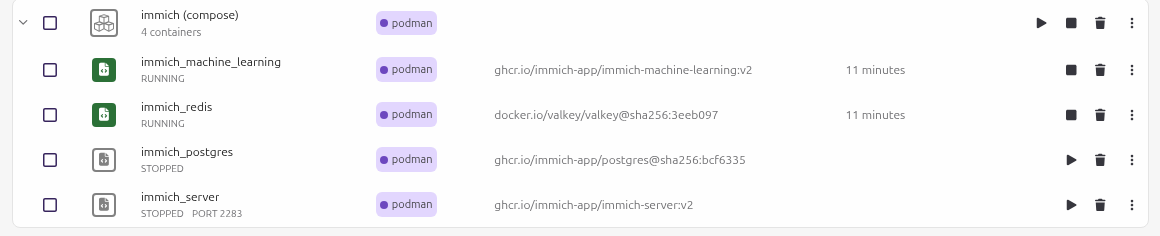
habe es soweit hingekriegt. Nur der Immich Postgres startet nicht. Da ich Podman Desktop verwende hier das Bild dazu:
Hier meine aktuelle YML-Datei:
name: immich
services:
immich-server:
container_name: immich_server
image: ghcr.io/immich-app/immich-server:${IMMICH_VERSION:-release}
# extends:
# file: hwaccel.transcoding.yml
# service: cpu # set to one of [nvenc, quicksync, rkmpp, vaapi, vaapi-wsl] for accelerated transcoding
user: '1000:1000'
security_opt:
- no-new-privileges:true
cap_drop:
- NET_RAW
volumes:
# Do not edit the next line. If you want to change the media storage location on your system, edit the value of UPLOAD_LOCATION in the .env file
- ${UPLOAD_LOCATION}:/data
- ${HOME}/Bilder:/mnt/media/Bilder
- ${HOME}/Videos:/mnt/media/Videos
- /etc/localtime:/etc/localtime:ro
env_file:
- .env
ports:
- '2283:2283'
depends_on:
- redis
- database
restart: unless-stopped
healthcheck:
disable: false
immich-machine-learning:
container_name: immich_machine_learning
# For hardware acceleration, add one of -[armnn, cuda, rocm, openvino, rknn] to the image tag.
# Example tag: ${IMMICH_VERSION:-release}-cuda
image: ghcr.io/immich-app/immich-machine-learning:${IMMICH_VERSION:-release}
# extends: # uncomment this section for hardware acceleration - see https://docs.immich.app/features/ml-hardware-acceleration
# file: hwaccel.ml.yml
# service: cpu # set to one of [armnn, cuda, rocm, openvino, openvino-wsl, rknn] for accelerated inference - use the `-wsl` version for WSL2 where applicable
user: '1000:1000'
security_opt:
- no-new-privileges:true
cap_drop:
- NET_RAW
volumes:
- ./ml-model-cache:/cache
- ./ml-dotcache:/.cache
- ./ml-config:/.config
env_file:
- .env
restart: unless-stopped
healthcheck:
disable: false
redis:
container_name: immich_redis
image: docker.io/valkey/valkey:9@sha256:3eeb09785cd61ec8e3be35f8804c8892080f3ca21934d628abc24ee4ed1698f6
user: '1000:1000'
security_opt:
- no-new-privileges:true
cap_drop:
- NET_RAW
volumes:
- ./redis:/data
healthcheck:
test: redis-cli ping || exit 1
restart: unless-stopped
database:
userns_mode: keep-id:uid=999,gid=999
container_name: immich_postgres
image: ghcr.io/immich-app/postgres:14-vectorchord0.4.3-pgvectors0.2.0@sha256:bcf63357191b76a916ae5eb93464d65c07511da41e3bf7a8416db519b40b1c23
user: '1000:1000'
security_opt:
- no-new-privileges:true
cap_drop:
- NET_RAW
environment:
POSTGRES_PASSWORD: ${DB_PASSWORD}
POSTGRES_USER: ${DB_USERNAME}
POSTGRES_DB: ${DB_DATABASE_NAME}
POSTGRES_INITDB_ARGS: '--data-checksums'
# Uncomment the DB_STORAGE_TYPE: 'HDD' var if your database isn't stored on SSDs
# DB_STORAGE_TYPE: 'HDD'
volumes:
# Do not edit the next line. If you want to change the database storage location on your system, edit the value of DB_DATA_LOCATION in the .env file
- ${DB_DATA_LOCATION}:/var/lib/postgresql/data
shm_size: 128mb
restart: unless-stopped
healthcheck:
disable: false
volumes:
model-cacheHier meine env:
# You can find documentation for all the supported env variables at https://docs.immich.app/install/environment-variables
# The location where your uploaded files are stored
UPLOAD_LOCATION=./library# The location where your database files are stored. Network shares are not supported for the database
DB_DATA_LOCATION=./postgres# To set a timezone, uncomment the next line and change Etc/UTC to a TZ identifier from this list: https://en.wikipedia.org/wiki/List_of_tz_database_time_zones#List
# TZ=Etc/UTC# The Immich version to use. You can pin this to a specific version like "v2.1.0"
IMMICH_VERSION=v2# Connection secret for postgres. You should change it to a random password
# Please use only the characters `A-Za-z0-9`, without special characters or spaces
DB_PASSWORD=postgres# The values below this line do not need to be changed
###################################################################################
DB_USERNAME=postgres
DB_DATABASE_NAME=immich
Hallo Robert,
habe es soweit hingekriegt. Nur der Immich Postgres startet nicht. Da ich Podman Desktop verwende hier das Bild dazu:

Hier meine aktuelle YML-Datei:
Hochgeladene Dateien:name: immich
services:
immich-server:
container_name: immich_server
image: ghcr.io/immich-app/immich-server:${IMMICH_VERSION:-release}
# extends:
# file: hwaccel.transcoding.yml
# service: cpu # set to one of [nvenc, quicksync, rkmpp, vaapi, vaapi-wsl] for accelerated transcoding
user: '1000:1000'
security_opt:
- no-new-privileges:true
cap_drop:
- NET_RAW
volumes:
# Do not edit the next line. If you want to change the media storage location on your system, edit the value of UPLOAD_LOCATION in the .env file
- ${UPLOAD_LOCATION}:/data
- ${HOME}/Bilder:/mnt/media/Bilder
- ${HOME}/Videos:/mnt/media/Videos
- /etc/localtime:/etc/localtime:ro
env_file:
- .env
ports:
- '2283:2283'
depends_on:
- redis
- database
restart: unless-stopped
healthcheck:
disable: false
immich-machine-learning:
container_name: immich_machine_learning
# For hardware acceleration, add one of -[armnn, cuda, rocm, openvino, rknn] to the image tag.
# Example tag: ${IMMICH_VERSION:-release}-cuda
image: ghcr.io/immich-app/immich-machine-learning:${IMMICH_VERSION:-release}
# extends: # uncomment this section for hardware acceleration - see https://docs.immich.app/features/ml-hardware-acceleration
# file: hwaccel.ml.yml
# service: cpu # set to one of [armnn, cuda, rocm, openvino, openvino-wsl, rknn] for accelerated inference - use the `-wsl` version for WSL2 where applicable
user: '1000:1000'
security_opt:
- no-new-privileges:true
cap_drop:
- NET_RAW
volumes:
- ./ml-model-cache:/cache
- ./ml-dotcache:/.cache
- ./ml-config:/.config
env_file:
- .env
restart: unless-stopped
healthcheck:
disable: false
redis:
container_name: immich_redis
image: docker.io/valkey/valkey:9@sha256:3eeb09785cd61ec8e3be35f8804c8892080f3ca21934d628abc24ee4ed1698f6
user: '1000:1000'
security_opt:
- no-new-privileges:true
cap_drop:
- NET_RAW
volumes:
- ./redis:/data
healthcheck:
test: redis-cli ping || exit 1
restart: unless-stopped
database:
userns_mode: keep-id:uid=999,gid=999
container_name: immich_postgres
image: ghcr.io/immich-app/postgres:14-vectorchord0.4.3-pgvectors0.2.0@sha256:bcf63357191b76a916ae5eb93464d65c07511da41e3bf7a8416db519b40b1c23
user: '1000:1000'
security_opt:
- no-new-privileges:true
cap_drop:
- NET_RAW
environment:
POSTGRES_PASSWORD: ${DB_PASSWORD}
POSTGRES_USER: ${DB_USERNAME}
POSTGRES_DB: ${DB_DATABASE_NAME}
POSTGRES_INITDB_ARGS: '--data-checksums'
# Uncomment the DB_STORAGE_TYPE: 'HDD' var if your database isn't stored on SSDs
# DB_STORAGE_TYPE: 'HDD'
volumes:
# Do not edit the next line. If you want to change the database storage location on your system, edit the value of DB_DATA_LOCATION in the .env file
- ${DB_DATA_LOCATION}:/var/lib/postgresql/data
shm_size: 128mb
restart: unless-stopped
healthcheck:
disable: false
volumes:
model-cacheHier meine env:
# You can find documentation for all the supported env variables at https://docs.immich.app/install/environment-variables
# The location where your uploaded files are stored
UPLOAD_LOCATION=./library# The location where your database files are stored. Network shares are not supported for the database
DB_DATA_LOCATION=./postgres# To set a timezone, uncomment the next line and change Etc/UTC to a TZ identifier from this list: https://en.wikipedia.org/wiki/List_of_tz_database_time_zones#List
# TZ=Etc/UTC# The Immich version to use. You can pin this to a specific version like "v2.1.0"
IMMICH_VERSION=v2# Connection secret for postgres. You should change it to a random password
# Please use only the characters `A-Za-z0-9`, without special characters or spaces
DB_PASSWORD=postgres# The values below this line do not need to be changed
###################################################################################
DB_USERNAME=postgres
DB_DATABASE_NAME=immich
Zitat von robertgoedl am 29. März 2026, 10:45 UhrIch werde es demnächst mal versuchen und berichten 🙂
Ich werde es demnächst mal versuchen und berichten 🙂